7 Methods for K-Electric Bill Payments
You can pay your K-Electric bill through seven primary methods, including mobile wallets (JazzCash/EasyPaisa), online banking, ATM transfers, the KE Live app, bank branches, customer care centers, and local post offices. Most digital payments confirm instantly, while physical methods offer receipt-backed security.
Do you want to pay the K-Electric bill quickly and conveniently? Whether you prefer the convenience of digital transactions or old-school in-person options, this guide details the seven best methods for paying your bill.
In case you lose your physical copy of the cashier’s check, make sure to check KESC duplicate bill status online. This guarantees that you have entered the right reference number while proceeding with a payment.
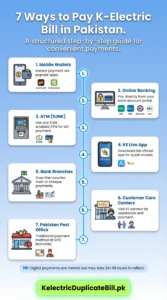
The most trusted ways to pay your K-Electric bill are the following:
How to Pay K-Electric bills using Mobile Wallets?
Mobile wallets are the fastest way to pay, anytime and anywhere.
JazzCash: Log in to the app or enter *786#. Press “Bill Payment” then select Electricity> K-Electric and enter the 13-digit Consumer Number to make a transaction.
EasyPaisa: Open the app and click on “Bill Payment”, select “Electricity”, then choose K-Electric, but remember to enter your Consumer ID. Always remember to save the digital transaction ID provided whenever a payment is made.
How to Pay an Electricity Bill through Online Banking?
Most of the banks are now providing direct utility payment facilities in Pakistan, such as HBL, UBL, MCB, Allied Bank, Meezan, and Bank Alfalah.
It can also be done through your bank’s mobile app.
- Locate the section for “Utility Bills” or “Bill Payment.”
- K-Electric Biller: Use your special K-Electric 13-digit Consumer Number for payment.
- Confirm the amount due on your screen and authorize payment using your secure PIN or OTP.
ATM Payments via 1BILL
All you need to do is use your ATM card at 1Link enabled ATM across Karachi without having to visit the bank branch.
- You have to insert your card and select the option for Bill Payment.
- Select “Electricity” and then click on “K-Electric.”
- Type in your Consumer Number. The amount due will be shown on the machine.
- Confirm the details to pay.
- Retain the printed receipt for your records.
How to Use the K-Electric “KE Live” App?
The KE Live Official app is an all-in-one account management application.
- Download the app and sign up using your Consumer Number.
- In the dashboard, you can see your current bill and press the ’Pay Now’ button.
- You could connect your debit/credit card or mobile wallet and pay through the app interface directly.
Note: This app is also a portal if you want to download the KESC duplicate bill upto the date to check tax or record.
Can I pay the Electricity Bill at Bank Branches (Over the Counter)?
If you are filing physical documentation, please visit any authorized commercial bank branch.
- When you arrive at the counter, bring your original bill copy
- You can pay by cash, cheque, or bank account debiting.
- You will receive a stamped receipt from the teller.
- Make sure to save this somewhere safe, as it acts as your receipt in the event of a billing issue.
KE Customer Care Centers
K-Electric has dedicated customer care offices throughout the city to address all payment and account-related concerns.
- Areas: Gulshan (Block 13-D), North Nazimabad (Block L), and Malir (Malir Cantt).
- Accepted Payment Types: Cash, debit cards, and credit cards are usually accepted at these centers.
- Usage: These centers are the direct and most official option if you are looking for where to pay K-electric bill in cash.
Pakistan Post Office
You may submit Pakistan electric bill payments at your post office in writing at the local branches.
- Simply show your utility bill at the counter.
- After they process the payment and give back a stamped acknowledgment receipt.
- For those who do not have access to banking, this method is highly reliable.
K-Electric Bill Payment Methods
| Payment Method | Processing Time | Ideal For | Key Requirement |
| Mobile Wallets | Instant | On-the-go users | Smartphone & App |
| Online Banking | 24–48 Hours | Account holders | Bank App/Web Login |
| ATM (1BILL) | 24–48 Hours | Offline convenience | ATM Card |
| KE Live App | Instant | Full account control | Registered Account |
| Bank Branches | 1–3 Business Days | Traditional payers | Physical Bill Copy |
| Customer Centers | Instant | In-person support | Consumer Number |
| Post Office | 3–5 Business Days | Cash-based payments | Physical Bill Copy |
Important Tips for Timely Payments
- Clearance Timings: Digital payments are instantaneous, but it takes K-Electric 24–48 hours to reflect them in their own system.
- No Late Fees: Pay before the official due date to avoid any 10% late penalty.
- Verification: If you pay online, always wait for the SMS confirmation from the payment counterpart.
- Auto-Pay: Figure out how to set up a recurring payment instruction in your banking app so that you can make sure your bill is paid each month automatically. This eradicates the risk of forgetting the deadline.